Get Started In 3 Steps
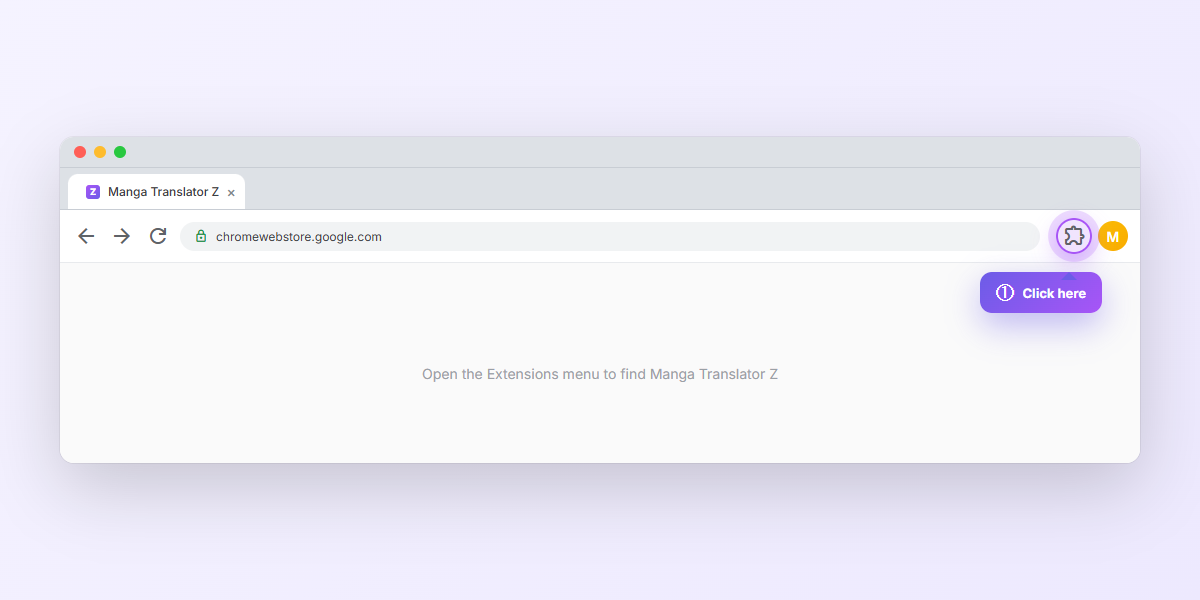
Click the puzzle-piece icon
Find it in the top-right corner of Chrome, next to your address bar. This opens the Extensions menu.
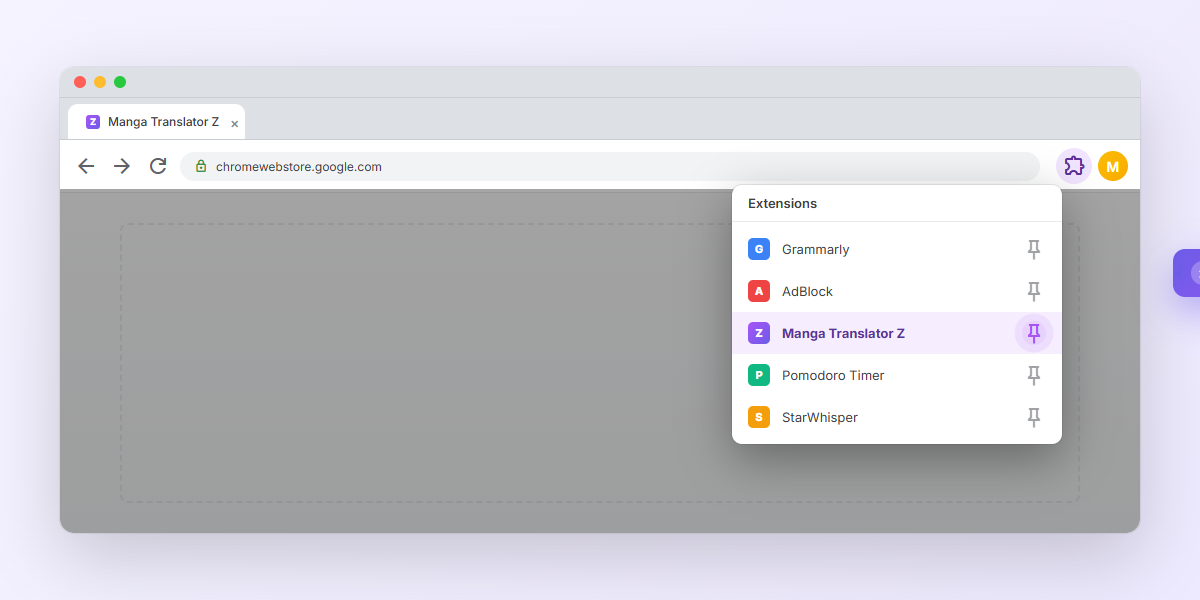
Pin Manga Translator Z to your toolbar
Click the pin icon next to Manga Translator Z in the dropdown. It'll stay visible in your toolbar for one-click access on any manga page.
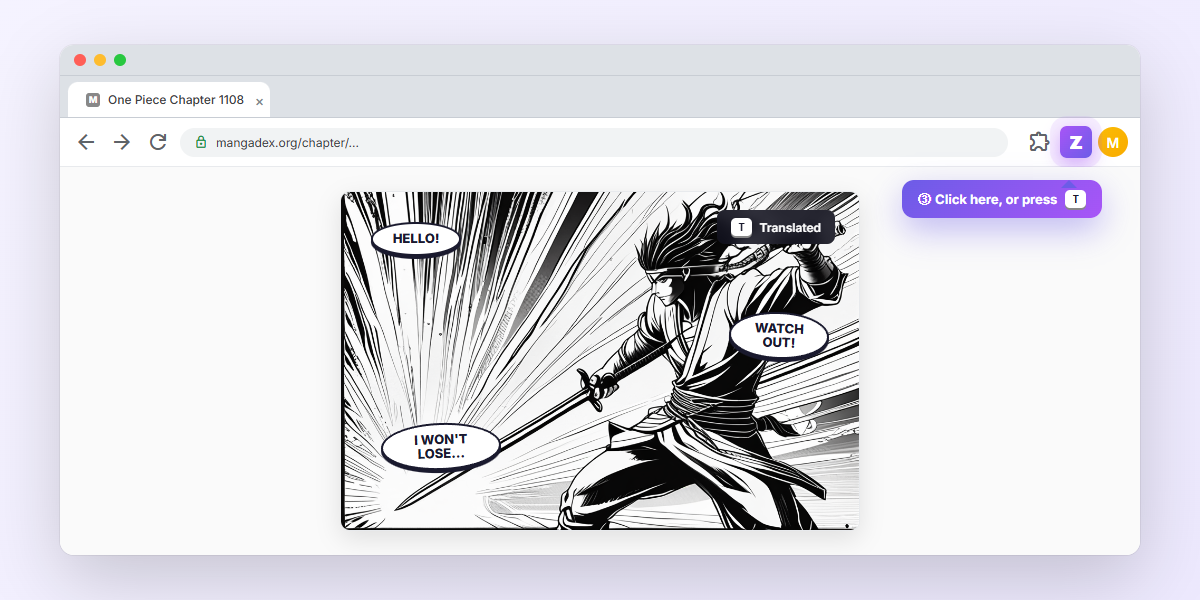
Open any manga page and press T
That's it. Mangadex, Webtoons, Bato.to, ComicK, raw scan sites, anywhere there's manga, the extension finds the bubbles, reads them, and translates them right where they were. You get 200 free translations per week, more than any competitor. Hover any bubble to see the original; click to reveal the original art underneath.
What you can do once it's running
A few features you'll discover after the first translation. Most are on by default; the rest are one toggle away in the popup.
Hover to peek at the original
Mouse over any translated bubble to see the original Japanese, Korean, or Chinese underneath, useful for language learners who want to verify a phrase.
Click to reveal artwork
Click any translated bubble to swap back to the original art. Click again to bring the translation back. Great for re-checking facial expressions or background details.
Inline editing
Double-click any translation to rewrite it, fix a name, tweak phrasing, or correct a punchline. Edits stay across page reloads.
Multi-page context
Character names, honorifics, and ongoing story beats stay consistent across the whole chapter. The translator remembers what happened on the last few pages.
Glossary
Lock in your preferred name translations (e.g. Hyakkimaru not Hyakkimaru-kun) across every series you read.
Auto-translate
Toggle on in the popup and every page translates the moment it loads. No clicks, no key presses, just keep scrolling.
Next-page prefetch
The next 1 to 3 pages translate quietly in the background while you read. By the time you flip, the next page is ready instantly.
Side-by-side mode
Prefer the original next to the translation? Switch in Display settings to see both panels stitched together.
Save & export
Right-click any translated page to save as PNG, or turn on auto-save to dump every translated page into your Downloads folder.
Custom fonts
Komika Hand (default), Bangers, Comic Neue, plus system fonts. SFX gets its own bold treatment so onomatopoeia still feels punchy.
Per-site rules
Different reader, different settings. Set a separate target language, tone, or model for MangaDex vs Webtoons vs your favorite raw aggregator.
SFX translation
Onomatopoeia (ドン, ガシッ) gets translated alongside dialogue, in a bold display style that reads like the original.
Unlock Pro Superpowers
Remove all limits and unlock advanced features.
Free Plan
- check200 free translations / week
- check11+ target languages
- checkHosted backend included
- close1,500 / 3,000 translations / month
- closeGlossary sync across devices
1,500 translations / month — cancel anytime
3,000 translations / month, for heavy readers
- check1,500 translations per month
- checkHosted backend — no API key setup
- checkGlossary sync across devices
- checkMulti-page context (up to 8 pages)
- checkPriority email support
verified_user 7-day money-back guarantee




Join 1,000+ Pro users

50 Best Sites to Read Raw Manga
The hand-picked list of where to actually find chapters the day they drop. Sorted by language, genre, and update cadence.
-
20 raw Japanese sites with chapters within hours of release
-
15 Korean manhwa platforms (Naver, Lezhin, Kakao and the indie ones)
-
15 Chinese manhua portals, including Kuaikan, Bilibili, and the long tail
-
Per-site notes: free vs paid, mobile-only, login required, region-locked
-
Weekly drop: new sites, language packs, and feature updates




Stop Typing. Start Talking.
StarWhisper turns your voice into text instantly. Works offline, 99% accurate, completely private.
No account needed · Works instantly




Get All 17 Pro Extensions for $9/mo
One subscription unlocks every Pro feature across the entire Peak Productivity suite. Every new extension we release is automatically included.
















$79/year (save 27%) · $149 lifetime · 7-day money-back guarantee
Want every option in detail?
The full guide covers backends, per-site rules, glossary syntax, troubleshooting, and more.