Ollama (Local)
Run translations entirely on your own machine — no internet, no API costs, complete privacy.
Overview
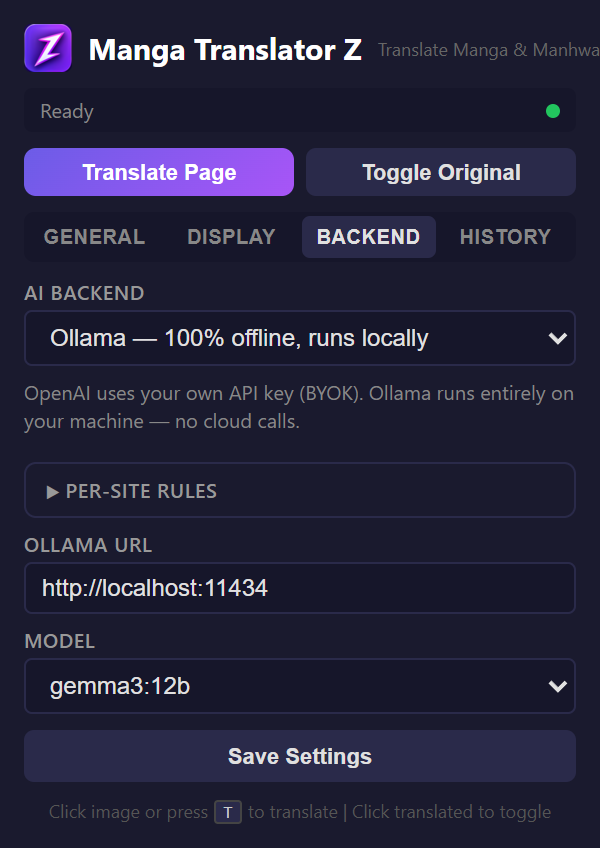
The Ollama backend runs entirely offline on your local machine. It sends the full manga image with a prompt to your local Ollama instance, which returns translated text with position data. This is the most private option — nothing leaves your computer.
Setup
- Install Ollama from ollama.ai
- Pull a vision-capable model:
ollama pull gemma3:12b - Start Ollama:
ollama serve - In the extension popup, go to the Backend tab
- Select "Ollama"
- Set the URL (default:
http://localhost:11434) - Select your model from the dropdown
- Click "Check Connection"
Recommended Models
| Model | Size | Quality | Best For |
|---|---|---|---|
| gemma3:12b | ~8GB | Good | Balanced quality and speed |
| llava:7b | ~4GB | Decent | Lower-end hardware |
| granite3.2-vision | Varies | Good | IBM's vision model |
| qwen3.5:9b | ~6GB | Good | Multilingual tasks |
GPU recommended
Vision models are computationally intensive. A GPU with at least 8GB VRAM will provide significantly better translation speed. CPU-only inference works but is much slower.