Custom Fonts
Pick the manga-style font for translated text. Bangers is the default and ships bundled alongside Komika Hand.
Bundled Fonts
Two professional manga fonts ship with the extension. Both load instantly — no download, no network call — and are licensed under the SIL Open Font License.
| Font | Style | Best For |
|---|---|---|
| Bangers (default) | Bold, all-caps comic display lettering — also used automatically for SFX regardless of this setting | Impact text, SFX, shouty dialogue |
| Komika Hand | Hand-lettered, energetic manga feel — rendered in ALL CAPS to match traditional scanlation typesetting | Everyday dialogue, longer speech bubbles |
Additional Font Options
The popup's Display tab also exposes these fallback choices. They render using the fonts already installed on your system (or the closest match your browser picks):
- Comic Neue — Open-source comic-style font
- Comic Sans MS — Classic comic look (installed on most systems)
- Arial — Clean, universal readability
- Segoe UI — Modern, professional
Configuring Fonts
Select your preferred font in the Display tab of the popup. The chosen font applies to all translated text overlays.
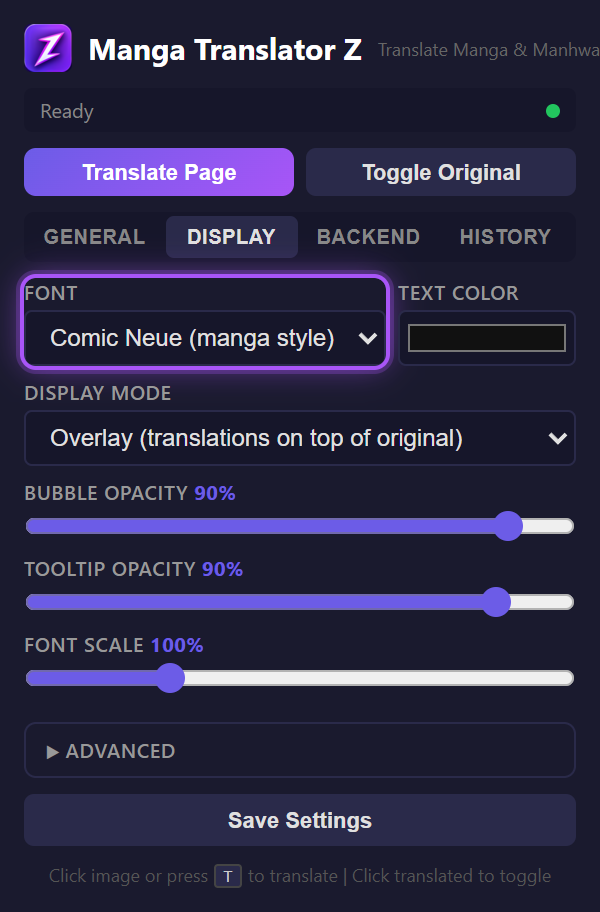
Font Scale
Adjust the font size with the Font Scale slider (50–250%) in the Display tab. This scales all text relative to the auto-detected bubble size, so a setting of 100% fills each bubble optimally.