OpenAI Vision (BYOK)
Bring your own OpenAI API key for premium-quality translations from GPT vision models. An alternative to the default Hosted Server backend.
Overview
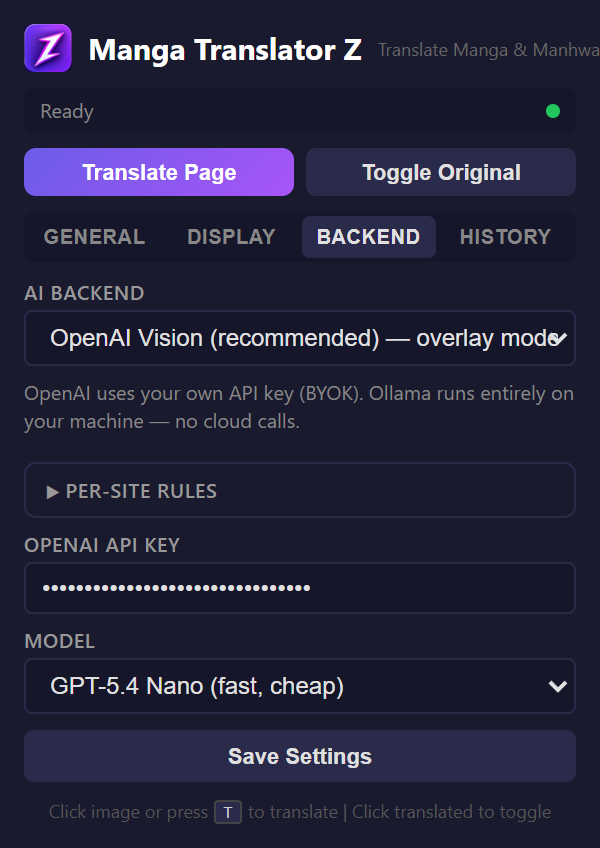
OpenAI Vision is a BYOK (bring your own key) alternative to the default Hosted Server backend. Pick it when you want full control over the model, direct OpenAI billing, or to avoid our weekly quota. Bubble detection still runs locally in your browser via PaddleOCR; individual bubble crops are then sent to OpenAI for OCR + translation.
The extension ships with the Hosted Server backend selected by default — no API key needed. Only switch to OpenAI Vision if you specifically want to supply your own key.
Setup
- Get an OpenAI API key from platform.openai.com
- Open the extension popup and go to the Backend tab
- Select "OpenAI Vision" as the backend
- Paste your API key
- Choose a model (see below)
- Click "Check Connection" to verify
Available Models
| Model | Speed | Quality | Cost |
|---|---|---|---|
| GPT-5.4 Nano | Fast | Good | ~$0.01/page |
| GPT-5.4 Mini | Medium | Excellent | ~$0.03/page |
| GPT-4o | Slower | Best | ~$0.05/page |
How It Works
- Detect — PaddleOCR finds bubble regions in the image (runs locally)
- Crop — Each bubble is cropped with 10px padding using OffscreenCanvas
- Translate — Up to 30 crops per image are sent to GPT as separate image parts
- Render — Translated text is drawn as canvas overlays on the original image
The API key is saved in your browser's local storage and is never sent to any server other than OpenAI's API. Track your costs in the History tab.
Cost Tracking
The extension tracks estimated costs per translation in the History tab. You can see total spend, number of translations, and tokens used.