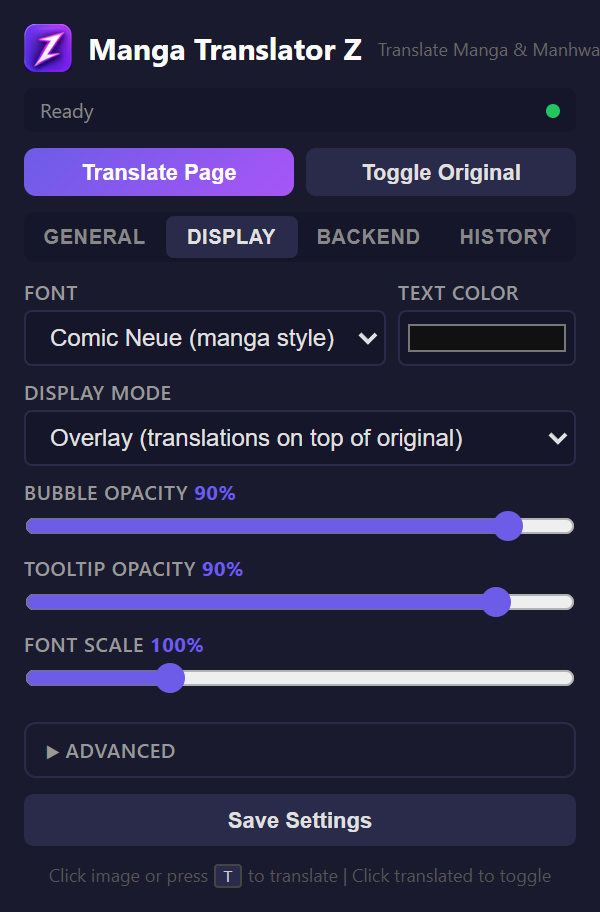
Display Tab
Control how translated text looks — fonts, colors, opacity, and bubble shapes.
Font Settings
| Setting | Options |
|---|
| Font family | Komika Hand (bundled, default), Comic Neue, Comic Sans, Arial, Segoe UI |
| Text color | Color picker (any hex color) |
| Font scale | 50%–250% slider |
Display Mode
- Overlay — Translated text rendered over original bubbles (default)
- Side-by-Side — Original and translated images shown at 50% width each
Opacity Settings
| Setting | Range | Description |
|---|
| Bubble opacity | 0–100% | Background opacity of translation bubbles |
| Tooltip opacity | 20–100% | Opacity of the hover tooltip |
Advanced Display Settings
| Setting | Default | Description |
|---|
| Bubble shape | Rounded | Rounded, Ellipse, or Rectangle |
| Min font size | 10px | Minimum font size for translated text |
| Bubble padding | 4px | Padding inside translation bubbles |
| Strict bubble separation | On | Prevents merging bubbles across panels |
| Merge distance | 12px | Distance threshold for merging nearby bubbles |